Azure APIM Architecture Made Easy: 3 Core Layers
Azure APIM Architecture & Core Components: A Deep Dive (Part 2)
In previous article of our Azure API Management series, we covered the fundamentals of what APIM is, why modern cloud applications require an API gateway, and how it simplifies security and governance.
To manage APIM effectively in production, it is essential to understand Azure APIM architecture. Whether you are migrating microservices or building a developer portal, mastering Azure APIM architecture ensures your platform scales securely without performance bottlenecks.
In this simplified deep dive, we break down the three primary operational layers of Azure APIM architecture, explore how its policy engine processes traffic, and examine the foundational building blocks you will interact with daily.
The Three Operational Planes of Azure APIM Architecture
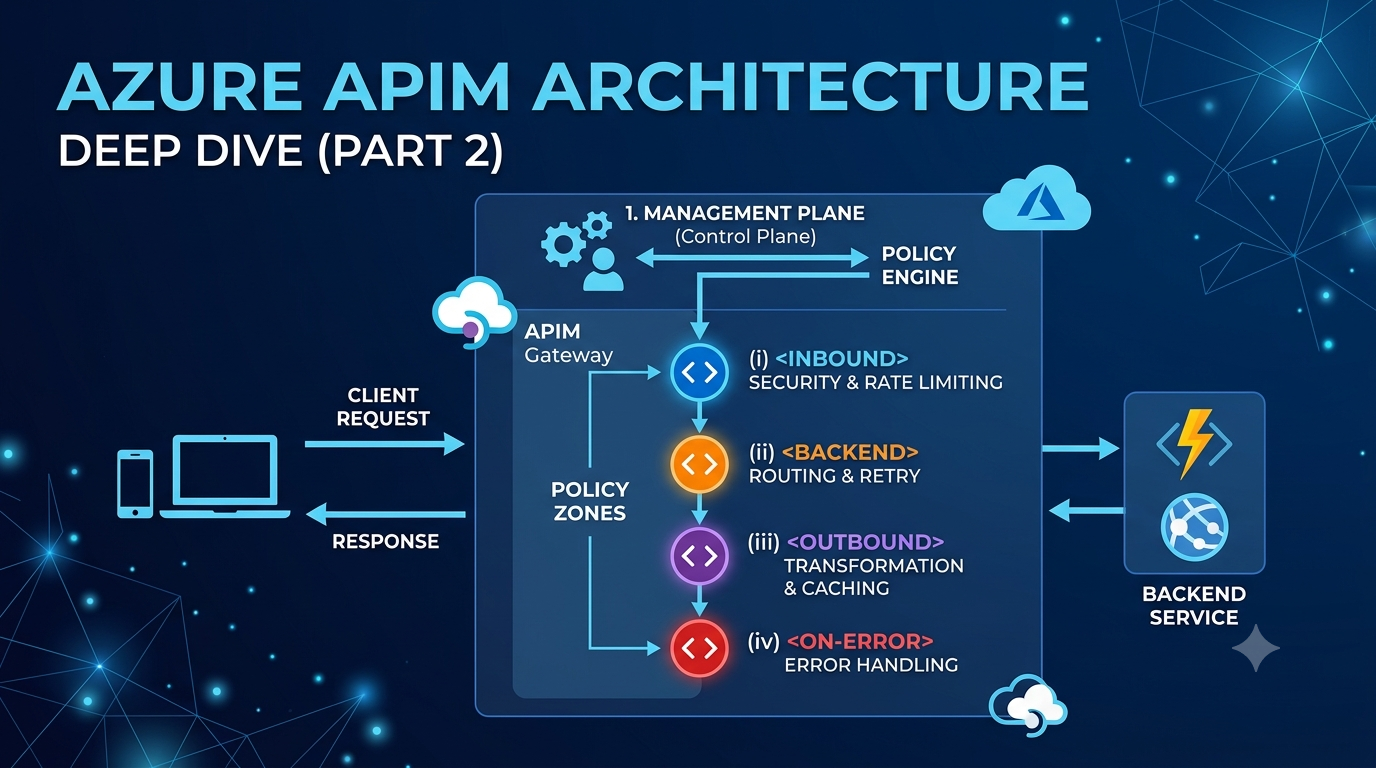
At its core, Azure APIM architecture is organized into three distinct operational layers (or “planes”). Decoupling these components ensures that administrative tasks (like updating policies) or developer browsing never slow down the live runtime traffic flowing to your APIs.
1. The API Gateway (Runtime Plane)
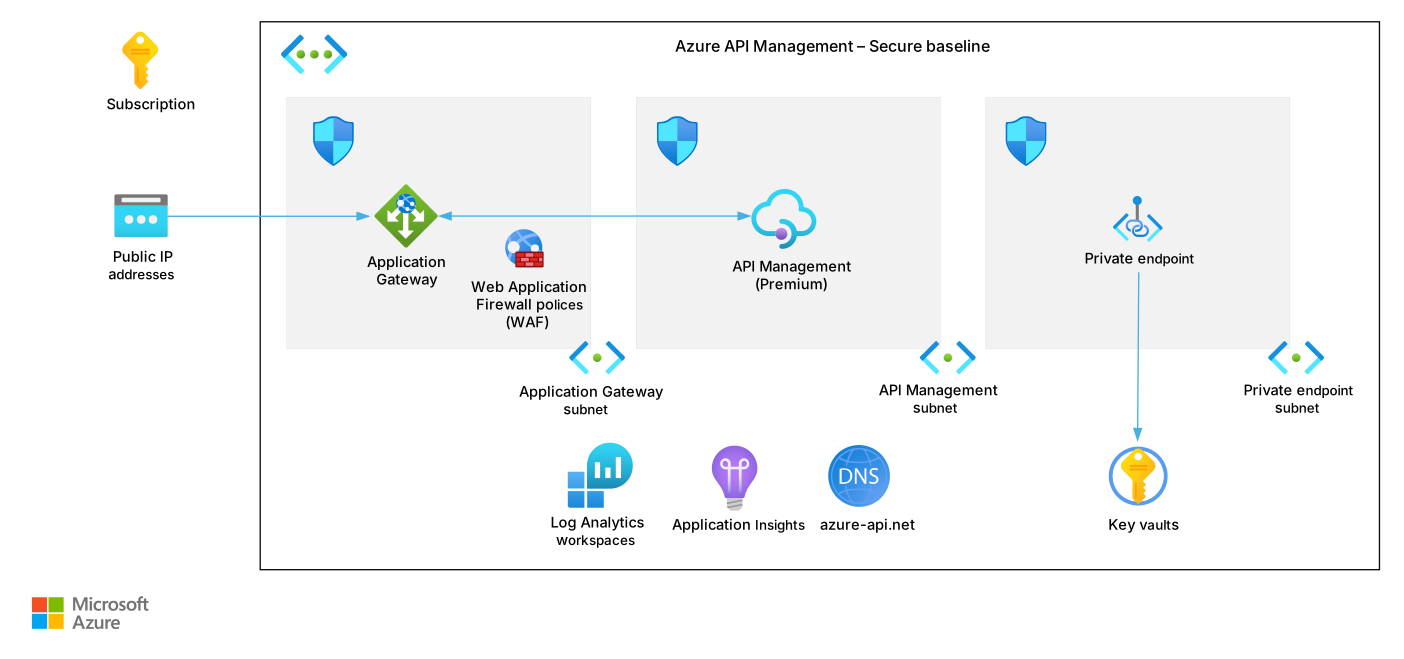
The API Gateway is the public “front door” for all incoming client requests. When evaluating Azure APIM architecture, remember that this is the only component processing your live API traffic.
When a client application makes an API call, the Gateway receives it, evaluates security rules, and executes policies (like rate limiting) before forwarding the request to your backend service (e.g., an Azure Function or Web App).
Key capabilities of the API Gateway include:
- Request Routing: Forwarding requests to HTTP endpoints, Azure Functions, Logic Apps, or AKS microservices.
- Security Enforcement: Validating JWT tokens, checking subscription keys, and enforcing IP whitelists.
- Traffic Control: Applying rate limits, call quotas, and response caching.
- Telemetry Generation: Emitting metrics, logs, and traces to Azure Monitor and Application Insights.
Note: The Gateway is stateless and built for ultra-low latency. It operates independently of the management dashboard.
2. The Management Plane (Control Plane)
The Management Plane is where administrators and DevOps engineers configure the APIM instance.
Whenever you create an API, write an XML policy to transform a response, or set up a custom domain name in the Azure Portal, you are interacting directly with the Management Plane. It stores your configurations and synchronizes them down to the API Gateway.
Key features of the Management Plane:
- Direct integration with Azure Resource Manager (ARM), PowerShell, Azure CLI, and Terraform.
- Management of user roles, RBAC access controls, and analytics aggregation.
- Configuration of Named Values and Azure Key Vault secret references.
3. The Developer Portal (Consumption Plane)
The Developer Portal is an automatically generated website that serves as the “shop window” for your APIs. It allows developers to discover, test, and subscribe to your APIs without needing access to your Azure portal.
Key features of the Developer Portal:
- Interactive API Documentation: Automatically renders OpenAPI (Swagger) specifications into readable interactive forms.
- Self-Service Onboarding: Allows developers to register accounts, request access, and generate API subscription keys.
- Try-It Console: Enables developers to execute live test requests directly from their browser.
| Component | Target Audience | Primary Function |
| API Gateway | API Consumers & App Clients | Processes runtime requests, enforces security, routes traffic |
| Management Plane | System Admins & DevOps | Provisioning, configuration, policy management, analytics |
| Developer Portal | External/Internal Developers | API discovery, documentation, subscription management, testing |
The Policy Execution Engine (The Core Processing Loop)
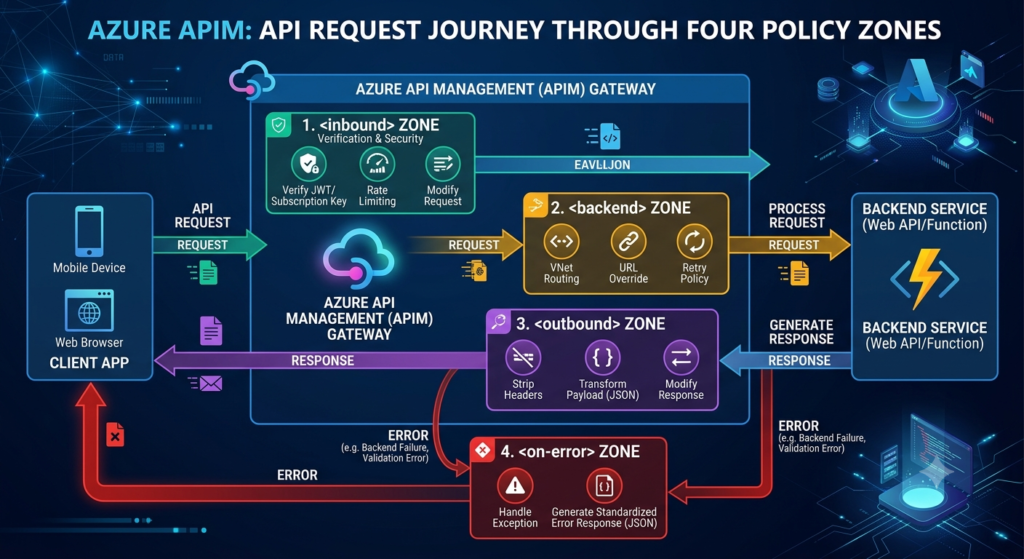
The policy execution engine is the heart of Azure APIM architecture. Policies are XML configuration blocks executed sequentially during an API call’s lifecycle.
You can think of policies as a pipeline that a request must flow through across four distinct zones:
Basic Policy Example: Modifying Headers
You will learn more about policy syntax in upcoming tutorials, but here is a basic example showing how the <inbound> and <outbound> zones work together:
<policies>
    <inbound>
        <base />
        <!-- Example: Pass a custom header to the backend service -->
        <set-header name="X-Custom-Request-Header" exists-action="override">
            <value>custom-value-from-apim</value>
        </set-header>
    </inbound>

    <backend>
        <base />
    </backend>

    <outbound>
        <base />
        <!-- Example: Remove sensitive backend server branding before responding -->
        <set-header name="X-Powered-By" exists-action="delete" />
    </outbound>

    <on-error>
        <base />
    </on-error>
</policies>Core Administrative Objects in APIM
Another key element of Azure APIM architecture is how resources are structured inside the control plane to govern client access:
- APIs & Operations: Represent your backend web services and individual HTTP routes (
GET,POST,DELETE). - Products: Logical containers used to package one or more APIs with specific access rules and rate limits.
- Subscriptions: Access credentials (subscription keys) granted to developers so they can call APIs inside a Product.
- Named Values: Global key-value pairs used as environment variables or references to Azure Key Vault secrets inside your policies.
💡 Deep Dive Alert: Want a complete breakdown of how to structure APIs, Products, and Subscriptions? Read our dedicated guide:Core Administrative Objects in Azure APIM: A Beginner’s Guide.
Frequently Asked Questions
What are the 3 main components of Azure API Management architecture?
The three core components are the API Gateway (runtime execution), the Management Plane (administrative control), and the Developer Portal (developer documentation and key provisioning).
What is the difference between Inbound and Outbound policies in APIM?
Inbound policies execute before the request reaches your backend service (e.g., authenticating tokens or checking rate limits). Outbound policies execute after your backend service responds, allowing you to modify headers or transform payload structures before sending data back to the client.
Do I need to understand advanced networking to start with APIM?
No! For standard scenarios—like securing public Azure Functions or Web Apps—you do not need deep networking knowledge. You can easily start managing APIs right away using default APIM public endpoints.
Conclusion & Next Steps
Understanding simplified Azure APIM architecture gives you the foundation to build resilient, secure, and well-organized API portals. By mastering how the three planes interact with the policy execution engine, you are ready to start publishing and securing your APIs.
Step 2: Check out our guide on Core Administrative Objects in Azure APIM to learn how to package and license your APIs!
Step 1: Review Part 1: Azure API Management (APIM): A Beginner’s Guide if you missed the basics.