Large language models are great at writing and explaining, but they don’t know anything about your documents: your product manual, your internal wiki or last month’s release notes. Ask them about these and they either refuse or, worse, make something up.
Retrieval-Augmented Generation (RAG) fixes this. Instead of retraining the model, you find the most relevant pieces of your own content and hand them to the model together with the question. In this guide we build a small RAG chatbot step by step, explain why each step matters, and cover the mistakes that make most first attempts give poor answers.
Key takeaway: RAG = search first, then generate. The quality of your answers depends far more on how you split and retrieve your documents than on which model you use.
What Is RAG and Why Use It?
A RAG system has two jobs. First it retrieves: it searches your knowledge base for the passages most related to the user’s question. Then it generates: it sends those passages to a language model with an instruction like “answer using only this context”.
Compared with fine-tuning a model on your data, RAG is cheaper, faster to update and easier to trust:
| RAG | Fine-tuning | |
|---|---|---|
| Update knowledge | Re-index the changed documents in minutes | Retrain the model |
| Cost to start | Low (embeddings + a vector store) | High (training runs, GPUs, data prep) |
| Show sources | Yes, you know which passages were used | No |
| Best for | Facts, docs, FAQs, policies | Tone, format, specialised skills |
How a RAG Pipeline Works
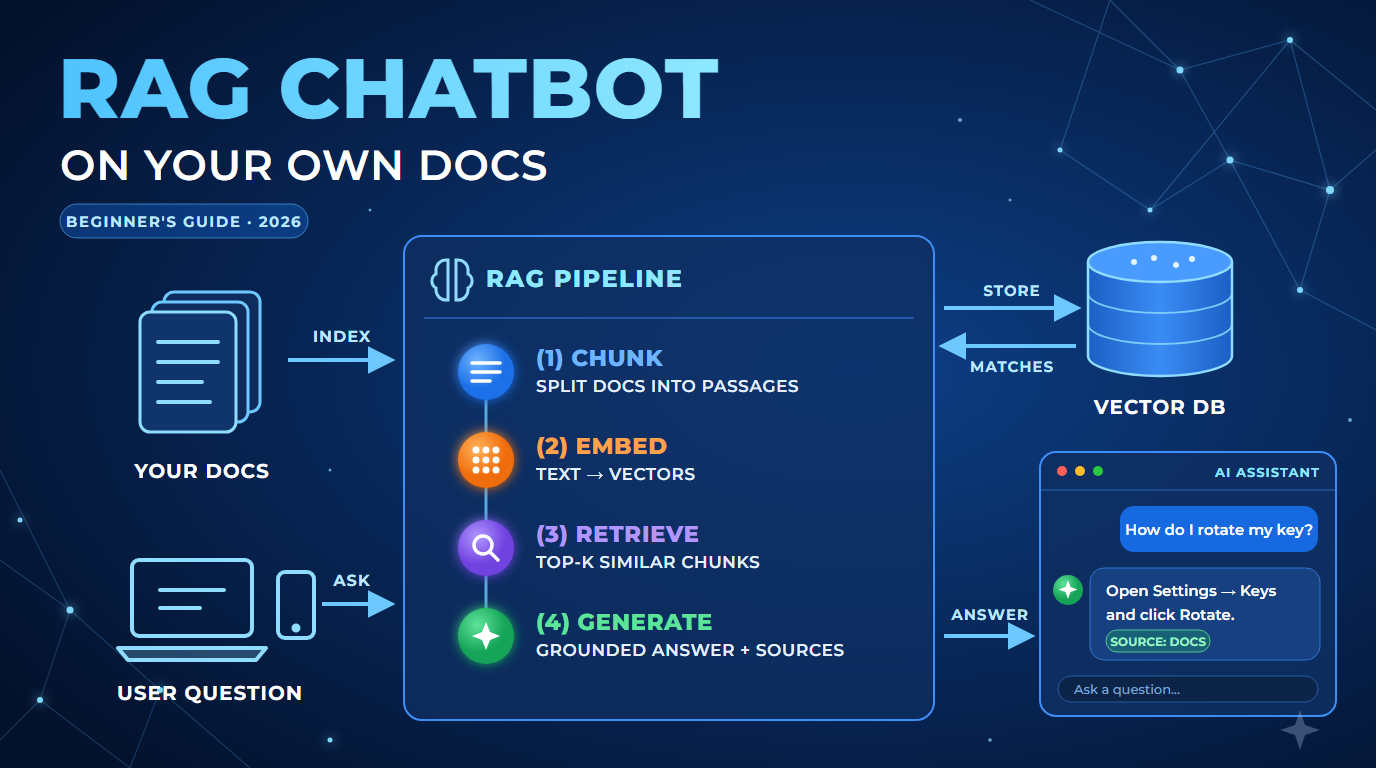
Every RAG chatbot, from a weekend project to an enterprise assistant, follows the same four steps:
- Chunk: split your documents into small, self-contained passages.
- Embed: turn each chunk into a vector (a list of numbers that captures its meaning) and store it.
- Retrieve: embed the user’s question the same way and find the closest chunks.
- Generate: send the question plus the retrieved chunks to the model and return its answer.
Steps 1 and 2 run once (and again whenever your documents change). Steps 3 and 4 run for every question.
Step 1: Split Your Documents into Chunks
Models have a limited context window, and search works better on focused passages than on whole files. A good starting point is chunks of roughly 300–500 words with a small overlap, so a sentence cut at the edge still appears whole in one of the chunks.
def chunk_text(text, size=400, overlap=60):
    """Split text into overlapping chunks of about `size` words."""
    words = text.split()
    chunks = []
    start = 0
    while start < len(words):
        end = start + size
        chunks.append(" ".join(words[start:end]))
        start = end - overlap
    return chunks
Splitting on headings or paragraphs first, and only then by length, usually gives cleaner chunks than cutting blindly every N words.
Step 2: Create Embeddings and Store Them
An embedding model converts text into a vector. Texts with similar meaning end up close together, even when they use different words: “reset my password” lands near “I forgot my login”.
For a prototype, a plain Python list is enough. For production, use a vector database or a search service with vector support, such as pgvector, Azure AI Search, Qdrant or Pinecone.
import numpy as np

# embed() calls the embedding model of your provider and returns a list of floats
index = []
for doc in documents:
    for chunk in chunk_text(doc["text"]):
        index.append({
            "text": chunk,
            "source": doc["title"],
            "vector": np.array(embed(chunk)),
        })
Always use the same embedding model for your documents and for the questions. Vectors from two different models can’t be compared.
Step 3: Retrieve the Best Matches
When a question comes in, embed it and rank the stored chunks by cosine similarity. Keep the top 3–5.
def retrieve(question, k=4):
    q = np.array(embed(question))
    def score(item):
        v = item["vector"]
        return float(q @ v / (np.linalg.norm(q) * np.linalg.norm(v)))
    return sorted(index, key=score, reverse=True)[:k]
Step 4: Generate a Grounded Answer
Now build the prompt. The instructions matter: tell the model to answer only from the context and to say so when the answer isn’t there. This one line removes most hallucinations.
def answer(question):
    hits = retrieve(question)
    context = "\n\n".join(f"[{h['source']}]\n{h['text']}" for h in hits)
    prompt = (
        "Answer the question using only the context below. "
        "If the answer is not in the context, say you don't know. "
        "Mention the source in brackets.\n\n"
        f"Context:\n{context}\n\nQuestion: {question}"
    )
    return ask_llm(prompt)  # call your chat model here
That’s a complete RAG chatbot. Wrap answer() in a small web API or a chat UI and you can put it in front of real users.
Common Mistakes (and How to Fix Them)
- Chunks that are too big: the right sentence gets buried in noise. Try smaller chunks before trying a bigger model.
- No metadata: store the title, URL and date with every chunk so you can show sources and filter out old content.
- Vector search only: product codes and exact names are often missed. Combine vector search with keyword search (hybrid search).
- No evaluation: write 20–30 real questions with known answers and re-run them after every change.
Production Checklist
- Documents re-indexed automatically when they change
- Every answer shows its sources
- Access control: users only retrieve documents they’re allowed to see
- An evaluation set of real questions, run on every change
- Logging of questions with no good match, so you know which docs to write next
FAQ
Do I need a vector database to start?
No. For a few hundred documents, an in-memory list like the one above works fine. Move to a vector database when you need persistence, filtering or millions of chunks.
Does RAG stop hallucinations completely?
It reduces them a lot, but it doesn’t remove them. Grounding instructions, showing sources and regular evaluation are what make a RAG system trustworthy.
Can I use RAG with any language model?
Yes. RAG only changes what you put in the prompt, so it works with any chat model, hosted or open source.